Features

Everything an AI employee does, deployed under your brand

Assistantz.ai gives every GoHighLevel sub-account an assistant that answers and makes calls, chats on nine channels, books into the calendar, updates contact fields and tags, sends follow-ups, calls external tools and hands off to humans, with the prompt written for you and usage rebilled at your markup.

Channels

One assistant, every channel a client uses

  • Inbound calls
  • Outbound calls
  • SMS
  • WhatsApp
  • Instagram DM
  • Facebook Messenger
  • Email
  • Website live chat
  • Website voice widget
Conversation abilities

What the assistant does during a call or chat

Book appointments 24/7, conversationally

Assistants book, reschedule and cancel appointments directly in GoHighLevel calendars with no setup, checking live availability mid-conversation.

  • Conversational booking with no setup
  • Reschedule and cancel appointments with contacts
  • Check a contact's current appointments
  • Dynamically check available slots

Outbound & inbound AI calling

Give a voice assistant its own Twilio number to make outbound calls or answer inbound calls, pull GoHighLevel data into the call, and book straight to the calendar.

  • Voice assistants with their own Twilio number
  • Books appointments and pulls GoHighLevel data into calls
  • Replace Missed Call Text Back with an AI receptionist

Custom field extraction & filling

The assistant pulls facts from the conversation — an address, a monthly revenue figure — and writes them to the contact's custom fields automatically.

  • Extract an address for an in-person roof inspection and update the contact
  • Capture monthly revenue and fill a custom value
  • No workflow required

Autonomous email & text follow-up

When a lead asks for more information the assistant drafts and sends the email itself, as an extra touchpoint, without a workflow.

  • Email leads autonomously as an additional touchpoint
  • Craft and send an email when a lead asks for information
  • Dynamic emailing inside the conversation

Add & remove tags

Assistants tag contacts on the fly — "qualified" when a lead meets your criteria, "customer support" when an existing client needs help — so your pipelines keep moving.

  • Tag "qualified" when a lead fits your metrics
  • Tag "customer support" when a client needs help
  • Dynamic add and remove

Custom tools & custom actions

Connect the assistant to any system in the world with custom actions, such as sending a solar-quote request to BuildShip or Zapier mid-call.

  • Connect to any system with custom actions
  • Send a solar quote request to BuildShip or Zapier
  • Build tools that make your agency stand out in its niche
Platform

What your agency gets around the assistant

White label, end to end

Your logo, colours and custom domain on the dashboard. Clients see your platform, never ours.

Rebilling and client wallets

Minutes, messages and phone numbers metered per client; set your markup, connect Stripe, invoice automatically.

Prompts written for you

The AI researches the client's website and services and writes an industry-specific prompt. Edit in plain language.

25+ languages

English, Spanish, French, German, Portuguese, Japanese, Hindi and more, with voice and language switchable per assistant.

Live transfer to humans

Warm or cold transfer to a team member mid-call when the caller asks for a person or the conversation needs one.

Knowledge base per client

Upload documents and pages so the assistant answers from the business’s own facts, not guesses.

Two-workflow deployment

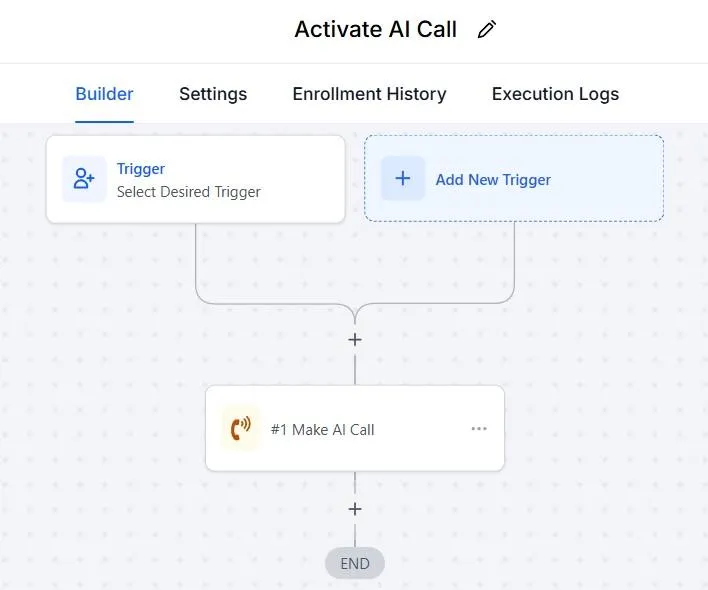
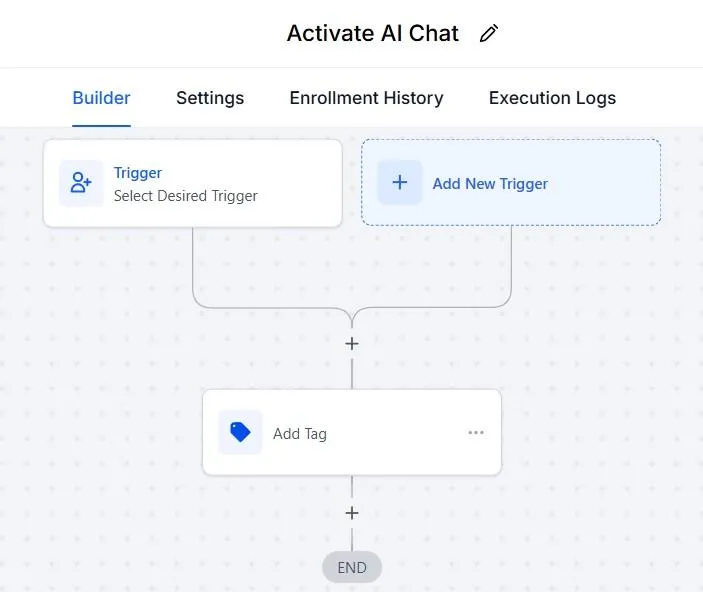
An inbound webhook and a post-call webhook, copied once from the knowledge base, put any assistant live.

Post-call tags and transcripts

Every call ends with tags applied and the transcript in GoHighLevel, so reporting is a pipeline view.

Deployment

Live in a sub-account in five steps

Most agencies deploy a first assistant in under an hour with the onboarding call: connect, create, assign a channel, add two workflows, test.

  1. 1
    Connect

    Install Assistantz.ai from the GoHighLevel App Marketplace and connect the client sub-account.

  2. 2
    Create the assistant

    Create a voice or chat assistant; the AI writes its prompt from the client's website. Fine-tune in plain language.

  3. 3
    Assign a channel

    Buy or import a phone number for calls, or deploy to SMS, WhatsApp, Instagram and Messenger with the active-tag method.

  4. 4
    Add two workflows

    Add the inbound webhook and post-call webhook workflows in GoHighLevel.

  5. 5
    Test and go live

    Call or message the assistant, check the booking lands in the calendar, and hand the client their branded dashboard.

GoHighLevel workflow oneGoHighLevel workflow two

See every feature working in your own account

Fourteen days free with a 1-on-1 onboarding call. Voice from 9¢ a minute, all-in.